01
Asset register
Know what you own, where it sits, and which parts belong on it. Hierarchy and history live in one place so planners and techs are not hunting spreadsheets.
Less tribal knowledge. Faster handoffs when someone is out.
CMMS features
Runspine is maintenance software with assets, PM, work orders, and a mobile app that works offline. It is built so technicians complete jobs without an enterprise IT project.
Runspine in use
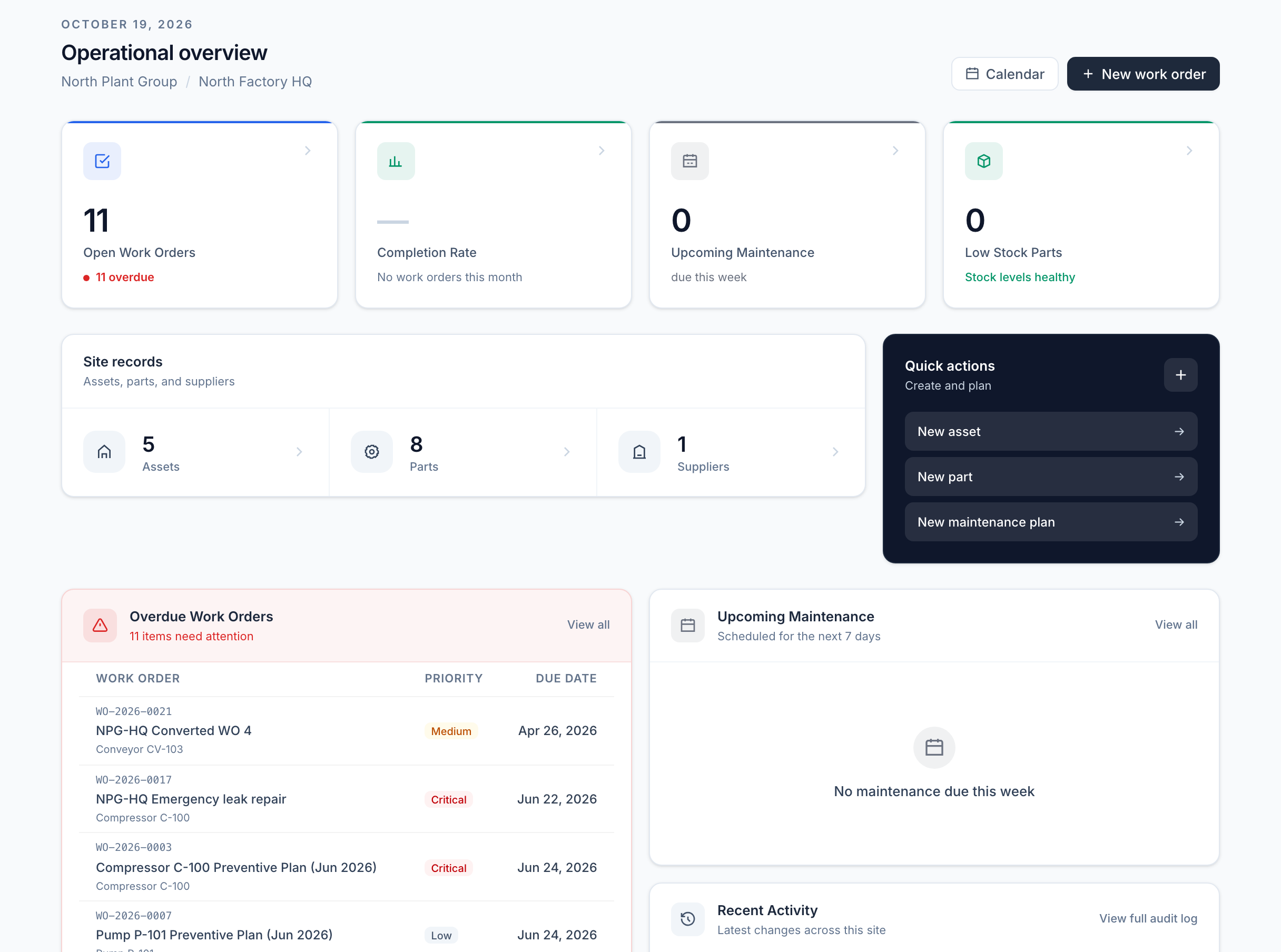
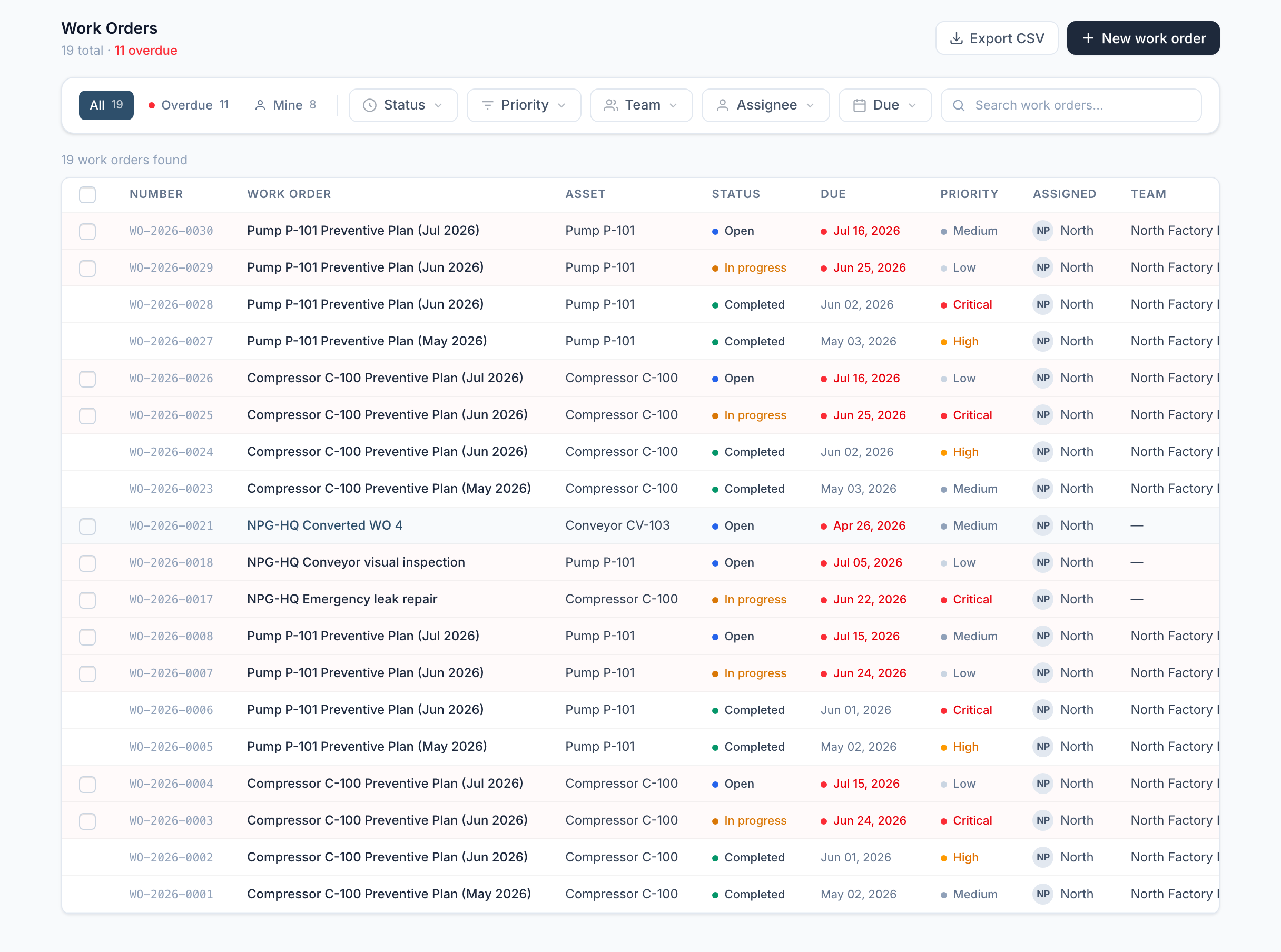
These are real Runspine screens from the product your team uses. Start with what is due, move into the work, and keep the history attached.
Mobile and offline
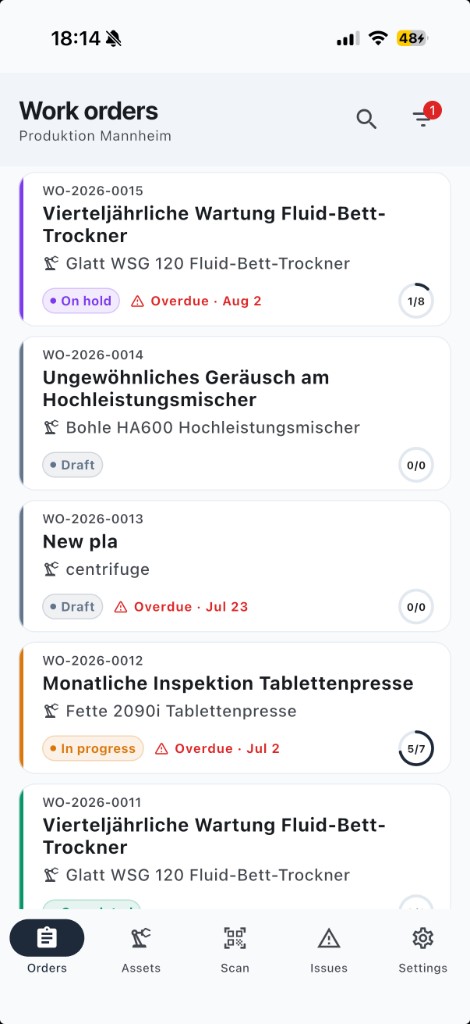
Technicians carry their assigned work on a phone or tablet. They can follow procedures and record completion on site, even when connectivity is unreliable, then synchronize when the connection returns.
More than a feature list
Most teams do not need another module. They need work to move from the planner’s desk to the asset. This page covers what Runspine includes, who it is for, and how packaging works so you can decide if it fits before a demo.
Calendar and meter plans create work orders when due. Overdue work is visible before an auditor or a breakdown finds it.
Procedures, time, photos, and signatures happen on mobile, including offline in the hall or basement.
Who did what, when, and with which parts is on the work order. Hand-offs and audits get shorter.
Eight areas that make up the maintenance loop. Each one is designed for daily use on the floor, not only for reporting.
01
Know what you own, where it sits, and which parts belong on it. Hierarchy and history live in one place so planners and techs are not hunting spreadsheets.
Less tribal knowledge. Faster handoffs when someone is out.
02
Plans by calendar or meter. When work is due, work orders create themselves so PM does not rely on memory or a weekly Excel review.
Fewer missed intervals. Clear ownership of what is due this week.
03
Assign the job, track status, and record time until it is done. Planners see the queue. Technicians see the next step and the procedure attached to the job.
Less status chasing in chat. Clear open vs done.
04
Technicians finish procedures on site, even when signal drops, with photos and signatures. The desk and the floor stay in sync when they reconnect.
Practical use on the floor, not a system that only exists at the desk.
05
See stock levels and what was used on each work order. Tie consumption to the job so inventory is not a separate guessing game.
Fewer wasted trips to the storeroom for a part that was never there.
06
Operators report issues. Planners triage and turn them into work orders without losing context in WhatsApp or email.
Faster intake. Cleaner prioritization.
07
Log hours and cycles so PM triggers on real usage, not only dates. Useful for pumps, presses, and anything that runs hard.
Maintenance timed to wear, not only to the calendar.
08
PM compliance, downtime, and a clear record of who did what. Ready when management or an auditor asks.
Evidence without rebuilding the story from paper.
Supporting tools around the core loop.
One connected workflow, with the right view for the people who plan, complete, and oversee maintenance.
Clear jobs on phone or tablet. Offline when connectivity is poor. Photos, signatures, and time on the job.
See what is due and overdue. Assign work. Keep PM from slipping without living in a spreadsheet.
Sites, users, and roles. Audit trail for the record. Start with one site, then expand.
Same product direction. Packaging matches how much of the loop you need on day one.
See full pricing€25 / full user / month
Assets, calendar PM, work orders, work requests, and offline mobile work with photos and signatures. The daily maintenance workflow for one site.
€49 / full user / month
Everything in Essential, plus meters, inventory, purchase orders, time tracking, reports, and CSV export.
Answers to the practical questions that usually come up before a demo.
It is a CMMS loop: assets, PM (calendar and meter), work orders, parts, requests, mobile, and audit trail. Work orders are the execution layer, not the whole product.
Yes. Every plan includes offline mobile work with photos and signature capture. Technicians can complete procedures without a signal and sync when they reconnect.
Yes. Runspine supports multiple accounts, each with its own sites. It is built for service and maintenance providers as well as single-plant teams.
Yes. We help migrate assets, plans, and history as part of go-live. We define the appropriate scope during the first demo call.
Essential at €25/user includes assets, calendar PM, work orders, offline mobile work, photos, signatures, and audit history. Unlimited at €49/user adds inventory, meter based PM, purchasing, time tracking, reports, and CSV export. Compare the full matrix on the pricing page.
We will map it to Runspine and cover features, packaging, and migration on the first call.